Senin, 02 Desember 2013

Baseball Heroes Hack

Maunya dari tadi buat vidionya dulu tapi sudahlah hari ini susah banget soalnya tugasnya numpuk ..langsung saja sudah malam aku mau istirahat juga.
Perlengkapan :
Aplikasi Disini
Updated Cheat 32bit ( - Hari ini, 26 November 2013 02:02 AM.)
VIDIO BARU AKAN KAMI GANTI NANTI SIANG ATAU SORE !!!
- Masuk ke dalam game baseball Heroes
- Attack browser yang kalian pake (saya sarankan menggunakan Chrome pada cheat ini)
- Continue
- Pada Loading 30-70% Enable/hidupkan Bypass
- Enable/aktifkan fitur lain ketika telah di lapangan
Features:
- Bypass (harus di aktifkan)
- No Absorb Combo (setelah dapat combo max maka kamu tidak akan hilang combo max untuk pertandingan selanjutnya, kecuali refresh game)
- +1 Max Combo (cukup dapat 1 point combo, maka akan combo max)
- Auto Swing (Mukul ndiri)
- AVG Friend 500 NEW FEATURE
Semoga Berhasil.... ^_^
NOTE : Jika tidak bisa karena koneksi mungkin bisa di coba referensi dari tips dan trick sebelumnya
Warning : Cheat ini akan update tiap pihak Baseball Melakukan Maintence pada Link Ini jadi jangan lupa di Bookmark
Hack Monster Legend

▁▁ ▂▂ ▃▃ ▄ ▅ ▆ ▇ Monster Legends - Links ▇ ▆ ▅ ▄ ▃▃ ▂▂ ▁▁
HANYA BERLAKU 1 ID SEKALI
==TUTORIAL MENCARI USER KEY==
==>>Untuk Mencari FB ID Cukup Scroll Layar Sampai Bawah Saat Maen Game
=================================================
~ Cara cari user key : (google chrome)
1.) Masuk DC / SE / SW / MOL
2.) Klik free gift
3.) Klik kanan mouse
4.) Pilih "View frame source"
5.) Klik CTRL+F
6.) Ketik "session" untuk DC / MOL | "flashuserkey" untuk SE / SW
7.) Geser ke kanan sedikit, Nanti kamu menemukan angka,angka itu tulis di sini
Contoh : sessionId:1234567 | flashuserkey : 1234567
=================================================
~ Cara cari user key : (mozilla firefox)
1.) Masuk DC / SE / SW / MOL
2.) Klik free gift
3.) Klik kanan mouse
4.) Pilih "this frame"
5.) Pilih "View frame source"
6.) Klik CTRL+F
7.) Ketik "session" untuk DC / MOL | "flashuserkey" untuk SE / SW
8.) Geser ke kanan sedikit, Nanti kamu menemukan angka,angka itu tulis di sini
Contoh : sessionId:1234567 | flashuserkey : 1234567
=================================================
~ Cara cari user key : (google chrome)
1.) Masuk DC / SE / SW / MOL
2.) Klik free gift
3.) Klik kanan mouse
4.) Pilih "View frame source"
5.) Klik CTRL+F
6.) Ketik "session" untuk DC / MOL | "flashuserkey" untuk SE / SW
7.) Geser ke kanan sedikit, Nanti kamu menemukan angka,angka itu tulis di sini
Contoh : sessionId:1234567 | flashuserkey : 1234567
=================================================
~ Cara cari user key : (mozilla firefox)
1.) Masuk DC / SE / SW / MOL
2.) Klik free gift
3.) Klik kanan mouse
4.) Pilih "this frame"
5.) Pilih "View frame source"
6.) Klik CTRL+F
7.) Ketik "session" untuk DC / MOL | "flashuserkey" untuk SE / SW
8.) Geser ke kanan sedikit, Nanti kamu menemukan angka,angka itu tulis di sini
Contoh : sessionId:1234567 | flashuserkey : 1234567
MOnster Galaxy Hack

Tutorial on how to use:
1.Download Monster-Galaxy-Hack-Tool.rar
2.Download and run Monster Galaxy Hack Tool
3.Enter the Stats or Amount you want to add
4.Click Generate and wait until finish hacking
5.Refresh your browser and then you will see the results
6.Enjoy & Have Fun
link net framework :
link password net framework :
Dragon City Hack Tools

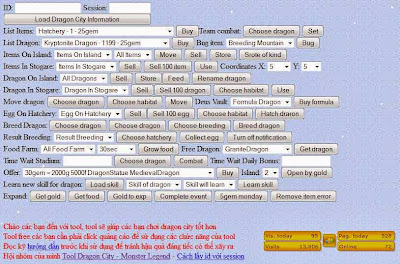
Dragon City Hack Event, Gems, Free Food, Exp, Gold, Dragon, Island, Cleaning items on the island like rock, tree, other and many more Update Monday, December 02, 2013.Update for Dragon City Site Tools (link tools).
Tutorial how to use Dragon City Hack Get All Dragon and All Habitat For Free:
- Log in to your facebook account and play Dragon City
- Find your facebook id and session id, to how to find facebook id and session id you can see in the video below.
- After that open this site:
DC Site Tools 1
DC Site Tools 2
DC Site Tools 3
DC Site Tools 4
you will be asked to fill out facebook id and session id, fill with your facebook id and session id - After it all filled and then click submit.
- The final step, reload your dragon city and see you storage
- NOTE: Use this tool if you have reached level seven or more.
Rabu, 27 November 2013
Cara upgrade Samsung Galaxy Young s-5360
How to upgrade 2.3.6 to 4.1.1
android systems
Cara Upgrade 2.3.6 ke 4.1.1
sistem android


MOHON DI SEDIAKAN BAHAN BERIKUT SEBELUM UPGRADE , UNTUK
MEMPERMUDAH KALIAN..!! DAN BACA INTRUKSI PERLAHAN-LAHAN, KARENA KALO ANDA
GAGAL, BUKAN TANGGUNG JAWAB SAYA. SAYA SUDAH MEMBUKTIKANNYA, DAN HASIL NYA
BAIK. OK..
Untuk MELAKUKAN UPGRADE ROM, HARUS sudah Galaxy YOUNG harus
Sudah ROOT (klo belum tau klik tulisan ini)
Bahan-Bahan
1. Samsung Galaxy Young gt-s5360
3. Quick boot Cari Di G P (Kalau males download matikan handphone pencet
bersamaan power+home+volume up)
4. GT_S5360_CWM => DISINI
5. tolong jangan ragu siapkan mental dan jangan takut!
pastikan uda ke download semua file diatas
1. Letakan JELLYBLASTV3.Signed.ZIP dan GT_S5360_CWM.ZIP di
SDCARD [Tidak DI FOLDER]
2. Pastikan KERNEL Masih BAWAAN
PABRIK [ kalo anda masih Menggunakan Ginggerbread 2.3.6 , Berarti KERNEL
anda masih PABRIK , aman Lanjut ke langkah di bawah
3. Kalo yang SDCARD nya di PARTISI , Hapus dulu APLKASI
tersebut , Misal : a2SD atau 2SD dan memFORMAT PASTISI nya. namun kalo Tidak di
PARTISI, abaikan saja. lanjut kebawah
4. Setelah Di pastikan Siap, Install
QUICKBOOT , Lalu JALANKAN.
5. Pilih RECOVERY, Lalu tunggu sampai Muncul tampilan " Android System Recovery"
6. Lalu Pilih Apply Update From SDCARD [
gunakan Tombol VOLUME kebawah atau keatas ]
7. Lalu
Pilih GT_S5360_CWM.ZIP , Lalu kalo sudah ,
8. Setelah itu maka akan keluar TAMPILAN " CLOCKWORKMOD RECOVERY "
9. Kalo Langkah di atas sudah
terlihat, Berlanjut lagi, anda pilih WIPE DATA/RESET YES DELETE ALL
10. kalo sudah , berikutnya Pilih WIPE CACHE PARTITION, YES DELETE ALL
11. Nah kalo sudah Semua WIPE DATA dan WIPE CACHE, Anda Pilih INSTALL ZIP FROM SD
12. lalu " CHOOSE ZIP From SDCARD"
13. Anda Arah Kan ke bawah sobat,
cari Yang namanya " JELLYBLASTV3.SIGNED.ZIP"
14. Kalo sudah Di Pilih Biarkan PROSES BELANGSUNG(
15. Proses REBOOT membutuhkan Waktu
SEDIKIT LAMA, JAdi Ketika Muncul Logo Samsung GALAXY YOUNG dan SAMSUNG, LALU
HITAM.. MOHON BIARKAN, sekitar 5 MENIT . JANGAN DI PAKSA di MATIKAN..!!! Maka
GALAXY YOUNG dengan OPERATING SISTEM TERBARU SIAP DI GUNAKAN.. enjoy..
Mantaps.. hehehe.. :3 dan ceklist
dibawah samsung home kalau ad muncul error force close sudah itu click holo
launcher!!! HAPPY PLAYING!!! THE ANDROID JELLY BEANS.
Kalau belu
menger kilk dibawah ini:
https://www.youtube.com/watch?v=Wtilrl_894A
OK
.. Tambahan Sobat.. Kalo sudah di COUSTOM ROM ini. Anda akan
mendapatkan fasilitas OTA
Apa itu OTA atau OVER THE AIR .. OTA adalah fasilitas yang
bisanya di sediakan Untuk Tipe smartphone kelas HIGHT yang mana Apabila ada
Updatean Operating system Ponsel, maka akan secara otomatis mendownload, dan
anda dapat pembaharuan Operating system ponsel.
Nah.. Coustom ROM ini juga di berikan Fasilitas OTA oleh si
pembuat, guna memperbaiki BUG BUG yang timbul. . atau penambahan FITUR.
Nah.. kemarin saya lupa.. padahal Coustom rom Ini sudah
memberikan 3 KALI update OTA.. Saya sudah mencobanya semua.. Kalo sobat
mau langsung mencoba nya semua SECARA BERTAHAP.. di persilahkan.. karena saya
akan sediakan KE tiga OTA nya..
Lag fix, better pop ups and buttons, fixed black text on
popups, stability fix..
Changelog:
1. Refined and polished status bar:
Roboto clock
Fixed overlapping of Settings button
and clear button.
Original JellyBean signal icons.
Improved swipe to clear.
2. Contacts app has hd contact image support.
3. Golden Play music icon and themed music background.
4. More polished and beautiful framework. Added back the
original jellybean battery icon.
5. Gallery with lockscreen wallpaper support.(Those who want
back the original ICS Gallery can download it under Troubleshooting below...)
6. An awesome messaging app:
Fixed white on white text bug.
No auto sms to mms conversion.
Theme support.
Added original ICS emoticons.
7.Built in ADBLOCKER.
8.Improved phone app
Changelog:
1.Audio Enhancements:
i. BEATS™ audio for Marvellous,
crisp sound. ( remember to exclude it from your task killer)
ii. SONY XLOUD™ enhancement for
controlling sound distortion in high sound levels.
iii. SRS WOW® HD.
iv. Dolby Digital 3D surround sound.
2. SONY CYBERSHOT™ Camera
enhancements: Clearer image even after zoom and larger image size ( 100%).
Adapted from Cybershot mod by Rizal Lovins.
3. Real JellyBean version image. ( Check by multiple
clicking the Android Version number under Settings/About phone.
4. New wallpapers from CM10, GS3 and JellyBean. ( Thanks to
Hmhadi98).
5. New GS3 lockscreen font and animation.
6. New AOKP inspired Status Bar toggles.
7. New bootanimation by Emanula, fixed by Alan.
8. New System App installer, this can be used to install
apps directly to System. Useful when you want to replace System apps.
9. New ICS on-off buttons in Settings and framework.
10.Better RAM usage.
11.Fixed alarm bug.
12. Latest Jellybean Youtube and PlayStore.
13. Improved MMS app.
14. Improved Dialer app.
Changelog:
1.Smoother framework.
2.Revamped UI.
3.Improved
i.Contacts,
ii.Phone,
iii.MMS,
iv.Music,
v.Memo,
vi.FM Radio.
vii. Clock App.
( Modded from HOLO theme by Alin Marin. Thanks!)
4.Integrated Adrenaline Engine.
5.Loopy Smoothness.
6.Improved boootanimation and boot sound by Ritayan.
7.A much improved hosts file.
8.StatusBar Greper ( available as a separate patch on my xda
page-look below ).
trus gimana cara ngistal OTA nya ??
mudah kok ni ada tutor nya
1. Pastikan Download OTA di ATAS,. TERSERAH MAU
DOWNLOAD yang man.. kalo sudah.. Pindahkan FILE ZIP tersebut ke SD CARD/OTA-UPDATER/DOWNLOAD
2. Kalo sudah di pastikan Di pindahkan. Buka Ke SETTING,
pilih paling bawah CHECK FOR UPDATE
3. Kalo muncul, Pemberitahuan Hidupkan WIFI, ya HIDUPkan aja. walawpun Tidak ada Wifi di sekitar anda
4. Menuju CHECK FOR UPDATE LAGI kalo ada pemberitahuan di
INGORE aja. kalo tampilan BLANK. tidak ada apa apa. Di Tekan tombol Sebelah
HOME, lalu pilih VIEW DOWNLOADS ROM
5. Nah.. Muncul kan Update ROm yang tadi di Pindahkan.
silahkan Pilih itu
6. Lalu pilih INSTALL
7. CEKLIST PADA WIPE Cache
AJA.
8. Lalu Pilih INSTALL. maka UPDATE akan PROSES.
9. setelah selesai, Maka Ponsel Akan REBOOT. dan masuk KE
Home SCREEN.. SELAMAT.. Update Sudah SELESAI..
sekian dulu ya postingan nya
Langganan:
Komentar (Atom)